Conversion tracking
Overview
Collective Audience™ provides a Click ID–based conversion tracking system designed to be reliable, privacy-friendly, and compatible with both client-side and server-side environments.
This system allows advertisers and publishers to track conversions using:
a simple image pixel,
JavaScript,
or a fully Server-to-Server (S2S) postback.
As long as the Click ID is correctly captured and returned, the conversion will be accurately attributed.
Step 1 – Click ID Injection (Audience Desk™)
When configuring a campaign in Audience Desk™, Collective Audience™ automatically generates a unique Click ID for each click.
URL Macro
You can inject this Click ID into the advertiser’s final URL using the macro:
[POSTBACK_CLICK_ID]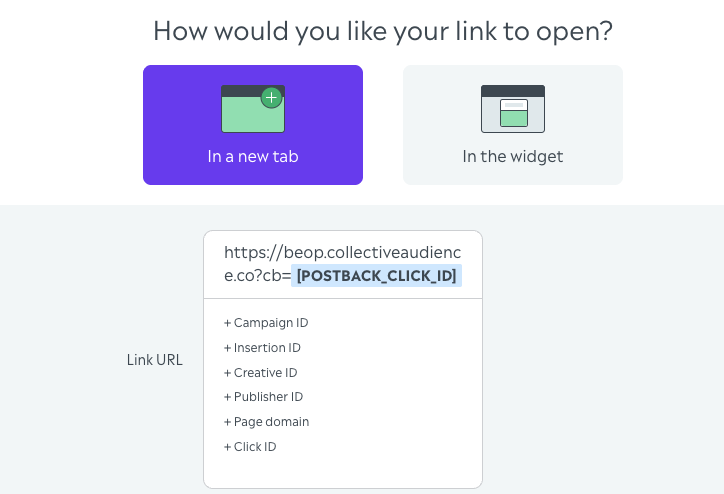
Example Final URL
https://www.advertiser-site.com/landing?sub_id=[POSTBACK_CLICK_ID]💡 Important: The advertiser is free to name the parameter however they want:
click_idsub_idcidtransaction_idor any custom name
Collective Audience™ will always populate it with the correct unique Click ID at click time.
Step 2 – Capture the Click ID on the Advertiser Side
When the user lands on the advertiser’s site, the Click ID is already present in the URL.
JavaScript Example
const params = new URLSearchParams(window.location.search);
const clickId = params.get("sub_id"); // or click_id, cid, etc.
Store this value until the conversion happens:
cookie
localStorage
session
backend database
Step 3 – Send the Conversion Event
Once the conversion occurs, send the Click ID back to Collective Audience™.
Option 1: Image Pixel (Simple & Universal)
<img src="https://s.collectiveaudience.co/tc?click_id=CLICK_ID_VALUE" />✅ Easy to implement ⚠️ Subject to browser limitations
Option 2: JavaScript Call (Client-Side)
fetch("https://s.collectiveaudience.co/tc?click_id=" + clickId, {
  method: "GET",
  mode: "no-cors"
});
Useful for SPA or client-side flows.
Option 3: Server-to-Server Postback (Recommended)
This is the most reliable method.
cURL Example
curl "https://s.collectiveaudience.co/tc?click_id=CLICK_ID_VALUE"Node.js Example
fetch("https://s.collectiveaudience.co/tc?click_id=" + clickId);✅ Not impacted by ad blockers ✅ Not dependent on browser consent ✅ Strongly recommended for performance and accuracy
What Happens on Our Side
When the conversion endpoint is called:
The Click ID is validated
The full delivery context is retrieved (campaign, creative, inventory, format)
The conversion is recorded and attributed
Data becomes available in reporting & analytics
No additional parameters are required.
Best Practices
Always pass the same Click ID received on landing
Prefer Server-to-Server postbacks
Trigger one call per conversion
Test with real traffic before scaling
Privacy & Compliance
No third-party cookies required
Click ID does not contain personal data
Fully compatible with consent-based environments (GDPR, etc.)
Summary
✔ You inject [POSTBACK_CLICK_ID] in the final URL ✔ The advertiser captures it on landing ✔ They send it back on conversion ✔ Collective Audience™ reconciles everything automatically
Simple, flexible, and reliable.
Need Help?
Contact your Collective Audience™ representative or support team if you need help validating your setup.